iSPPlayerby iShieldProtect®
v6 All-new native Android and iOS apps

The secure player for every lesson you sell.

iSPPlayer plays your encrypted videos, PDFs and tests in your own branded app. Screen recording blocked, locked to one device, and it works offline, even from a pen drive.

4 platformsWindows, Mac, Android, iOS
2 Lakh+students
Offlinedownload or pen drive

Available on the App Store and Google Play, plus Windows and Mac

Windows macOS Android iPhone and iPad
Features

Protection students cannot get around. Playback they love.

Everything an institute needs from a player, in one app.

Protection

  • Screen recording, screen capture and mirroring blocked
  • Dynamic moving watermark over every lesson
  • Root, jailbreak and emulator detection
  • In-process decryption, with no local file server to tap
  • VGA/HDMI output blocked without your permission

Playback

  • Full HD player
  • Speed control, seek and fast forward for revision
  • Adaptive bit rate plus manual quality selection
  • Video, audio, PDF and eBook in one app

Offline and distribution

  • Download and play without internet
  • Import course zips and folders
  • Pen drive, USB and SD card courses

Management and licences

  • Single-device activation keys
  • Course expiry, enforced offline with trusted time
  • View limits, licence re-sync and remote disable

Live

  • Live Events tab in the app
  • Secure live lessons via YouTube or AWS
  • Online course catalogue

White-label, in your brand

Students download your app, with your name, logo and colours, from Google Play and the App Store, plus Windows and Mac installers. Already have an Android app? Our Android library adds the same protection to it.

  • Your own store listing
  • Student dashboard for course access and licences
  • Secure test papers, practice tests, ranking and progress reports
Offline and pen drive

Teach students the internet has not reached yet

Many learners study on weak or costly data. With iSPPlayer they get the whole course once, then learn offline, safely.

  • Download lessons inside the app and watch anywhere
  • Ship courses on a pen drive, USB stick or SD card
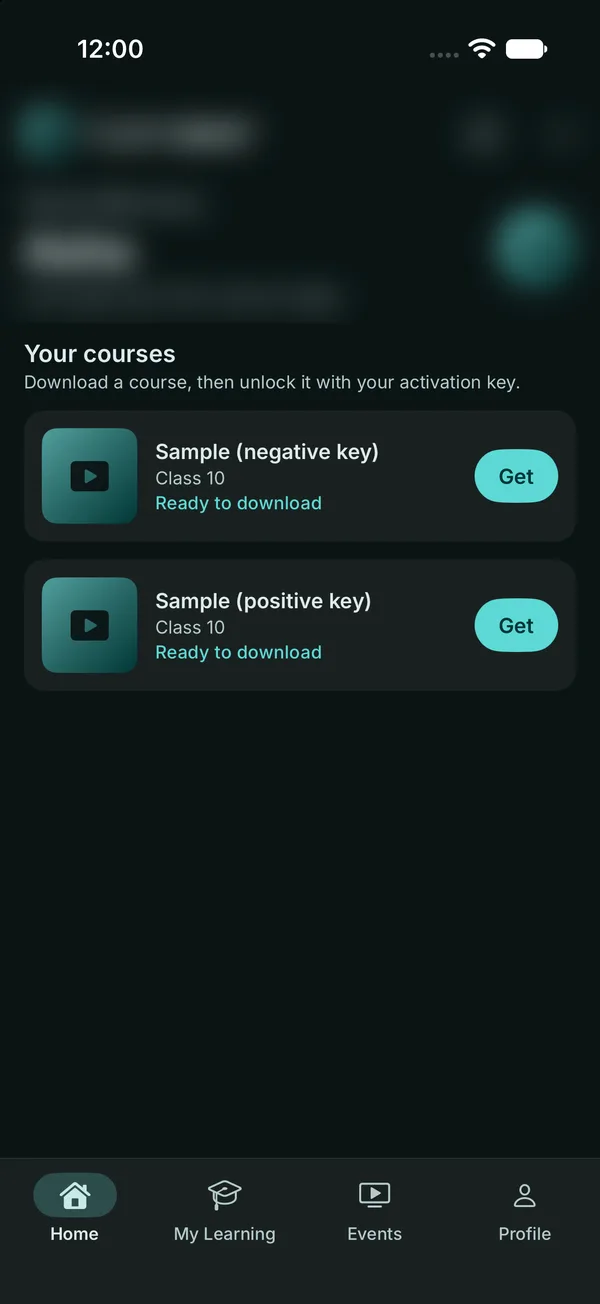
  • On phones, import course zips or folders from the Files app or an attached drive
  • Keys stay bound to the device and expiry is checked with trusted time, even offline

Copy the encrypted course

To a pen drive, SD card or download from your cloud.

Import in iSPPlayer

Pick the zip or folder. The app recognises the course.

Activate once, study offline

The activation key locks the course to this device for the period you set.

How it works

Set up in days, not months

Encrypt

Encrypt videos, PDFs and tests on your computer before they go anywhere.

Publish

Host on your own cloud for streaming and download, or copy to drives.

Brand

Get your white-label app on Google Play, the App Store, Windows and Mac.

Control

Issue device-bound keys, set validity, limit views and disable remotely.

Compare

iShieldProtect vs cloud-only DRM players

Cloud DRM video hosts are great for streaming. Education needs more than streaming.

What you neediSPPlayer + iShieldProtect®Typical cloud-only DRM player
Offline learningTrue offline on Windows, Mac, Android and iOSBuilt around streaming; offline depends on the app you build
Pen drive, USB and SD card coursesBuilt in, with remote disableNot offered
Secure PDFs, eBooks and testsVideo, audio, PDF, eBook and test papersMainly video
Your own branded appsWhite-label apps on 4 platforms, on the storesAn embeddable player or SDK; you build the app
Where content livesYour own cloud storageProvider's cloud
Bandwidth costNo per-GB bandwidth markupPlans metered by bandwidth
Device-bound keys offlineKeys and expiry keep working offlineLicences usually checked online
Tests, ranking and progressIncludedNot included

Comparison with typical cloud-hosted DRM video players. Features of individual providers vary.

See it in action

iSPPlayer in two minutes

A quick tour of protection, offline learning, platforms and licence control.

Product video coming soon

Meanwhile, see it live with our team.

Book a live demo
FAQ

Questions, answered

Can students screen-record or mirror lessons?

No. Screen recording, screen capture and mirroring are blocked, a moving watermark is shown on every lesson, and the app refuses to run on rooted, jailbroken or emulated devices.

Does iSPPlayer work offline?

Yes. Students can download lessons in the app, or import course zips and folders from a pen drive, SD card or the Files app, and study with no internet. Device binding and course expiry still apply.

Which devices are supported?

Windows, Mac, Android and iOS. The mobile apps are available on the App Store and Google Play.

Can the app carry our institute's name?

Yes. We publish white-label apps in your name and brand on all four platforms.

What content can it play?

Encrypted videos (mp4), audio (mp3), PDFs, eBooks and test papers, plus live sessions via YouTube or AWS.

Where is our content hosted?

On your own cloud storage, so you are not charged a per-GB bandwidth markup.

How do I try it?

Start a 30-day free trial or book a demo using the form below, or message us on WhatsApp.
Put your content in a player pirates cannot beat.

Start your 30-day free trial or book a demo. We will show iSPPlayer running your own lessons.

Get started

Try iSPPlayer free for 30 days

Tell us a little about your institute and we will set up a trial or a demo.

This opens your email app with the details filled in, addressed to support@spvtechventures.com.